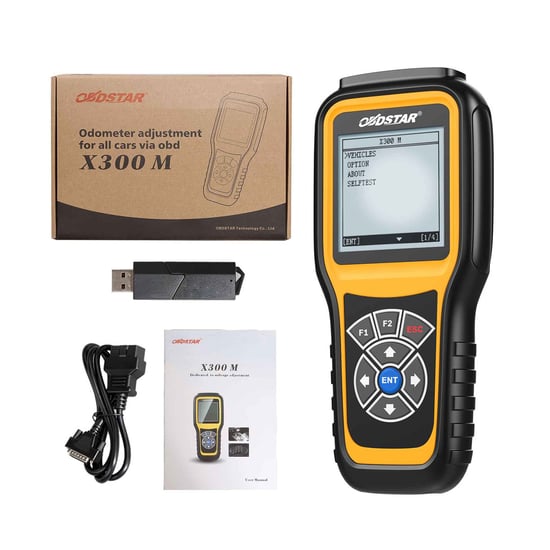
OBDSTAR X300M Special for Cluster Calibration
OBDSTAR X300M Description:
OBDSTAR X300M is a professional cluster calibration tool designed for odometer adjustment and dashboard programming. It adopts a high-speed ARM processor that ensures fast performance, stable operation, and strong anti-interference capability. The device is suitable for many vehicle brands and models, but it does not support most vehicles produced from 2017 and newer.
Note: OBDSTAR X300M stopped receiving updates after June 2020. If you need to work with newer vehicles, it is recommended to use the OBDSTAR Odo Master instead.
Main Function:
- Cluster Calibration (Odometer Adjustment)
- Dashboard Mileage Correction
- Read Current Mileage
- Write New Mileage
- EEPROM Data Backup and Restore (for supported models)
- Flash Backup (for some supported models)
Vehicle Brand Coverage:
- Audi / VW / Skoda / Seat
- Bentley
- Mercedes-Benz
- Besturn
- Chrysler / Dodge / Jeep
- Citroen
- Ford
- Fiat
- Geely
- GM (Buick / Cadillac / Chevrolet / Hummer)
- GMC
- Great Wall
- Hyundai
- Jaguar
- Kia
- Land Rover
- Mazda
- Mitsubishi
- Nissan
- Opel
- Peugeot
- Porsche
- Pontiac
- Proton
- Renault
- Roewe
- Saturn
- Smart
- SsangYong
- Toyota
- Infiniti
- Volvo
Important Notes:
- X300M does not support most vehicles produced from 2017 and newer.
- The device no longer receives software updates.
- Not compatible with Honda, BMW and Mazda CX-5 (2017).
- If compatibility issues occur, there will be no new updates or fixes.
- For newer vehicles, OBDSTAR Odo Master is recommended.
Ford F Series Supported Models:
| Brand | Model | Year |
| Ford | F150 | 2006-2007 |
| Ford | F250 | 2006-2007 |
| Ford | F350 | 2006-2007 |
| Ford | F450 | 2006-2007 |
| Ford | F500 | 2006-2007 |
| Ford | F550 | 2006-2008 |
How to Use OBDSTAR X300M:
- Connect the X300M device to the vehicle via the OBD2 socket.
- Select “Vehicles” and then choose “Cluster Calibrate”.
- Select the vehicle brand and model.
- Initialize and authorize communication.
- Choose the correct vehicle year and start cluster calibration.
- The device reads the current mileage.
- Enter the new mileage value.
- The system completes mileage adjustment.
OBDSTAR X300M Package Includes:
- 1pc x X300M Main Unit
- 1pc x Main Cable
- 1pc x SD Card
- 1pc x SD Card Reader
- 1pc x User Manual